• Link us
  • Links
  • Hosting
  • TOS
  • Site
  • Gallery
  • Forum

Patterns (Adobe Photoshop) tutorial

Tutorials > Adobe Photoshop > Patterns
  • Added: Sep 3rd, 2006
  • Level: Easy
  • Author: Melfina
  • Program version: 7.0
  • Reads: 13859
  • Description: How to use, load and create patterns in Photoshop.
Bookmark Digg del.icio.us

E-mail to a friend

View printable version

Get help on this tutorial

Loading patterns
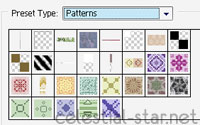
Open Photoshop and click on Edit > Preset Manager.... A window will open, there, where it says Preset type, select Patterns.

Now click on Load... and browse your folders to find the .pat file you want to load and click OK. If you scroll down, you'll see your newly loaded patterns.
Creating patterns
When you've created your pattern, simply click on Edit > Define pattern and input a name. From now on, you'll be able to use your own pattern.

Using patterns
Click on Edit > Fill and select Pattern from the drop down as shown below.

Select the pattern you'd like to use and click OK. The pattern is now applied to your images!


If you like this tutorial why not digg it or add to del.icio.us? You can also comment this tutorial or ask for help on its forum topic.

Tutorial © Melfina. Do not reproduce in any way without previous permission from the author.

  • Members login
  • Register for free

Web layouts

  • Web layouts
  • Aardvark Topsites skins
  • SMF Themes
  • Wordpress Themes
  • MySpace layouts

Graphic resources

  • 100x100 Avatars
  • PS and PSP brushes
  • Brush shop *new*
  • Background patterns
  • Web icons and smilies
  • Textures
  • Renders (PNG)

Tutorials

  • Newest tutorials
  • Adobe Photoshop
  • CSS
  • Designs / Layouts
  • HTML & XHTML
  • Miscellaneous
  • Paint Shop Pro
  • PHP & MySQL

Affiliates

  • Aethereality
  • AnimeShare
  • DayDreamGraphics
  • Digik Designs
  • Dragonrain
  • Ego Box
  • Endless Light
  • Magitek Designs
  • Stats & information

File sponsors

  • Moonlit Magick
  • Silent Cross
  • TyL Hosting

My other sites

  • Anime Artbooks
  • BleedingSoul
  • Ragnarok Online
  • Top Ragnarok Online

Vote us

  • BleedingSoul Topsites
  • Cute top 25

Go up
eXTReMe Tracker
  • Valid XHTML
  • Valid CSS
Celestial Star © Melfina 2003-2008. By using this site you agree to our terms of service. Credits: Web designer wall, Bittbox